
Free
$0
/ forever
WordPress user sync, role tags, and 3 WordPress events, plus optional Messenger.
Included
- ✓ Basic WordPress user sync
- ✓ 3 basic WP events
- ✓ Basic role tags
- ✓ Event prefix
- ✓ Optional Messenger + IDV
- ✓ Email support
WooCommerce Intercom Sync
Customers, orders, cart events, and store metrics land on the Intercom contact so agents and Series see what shoppers actually did.
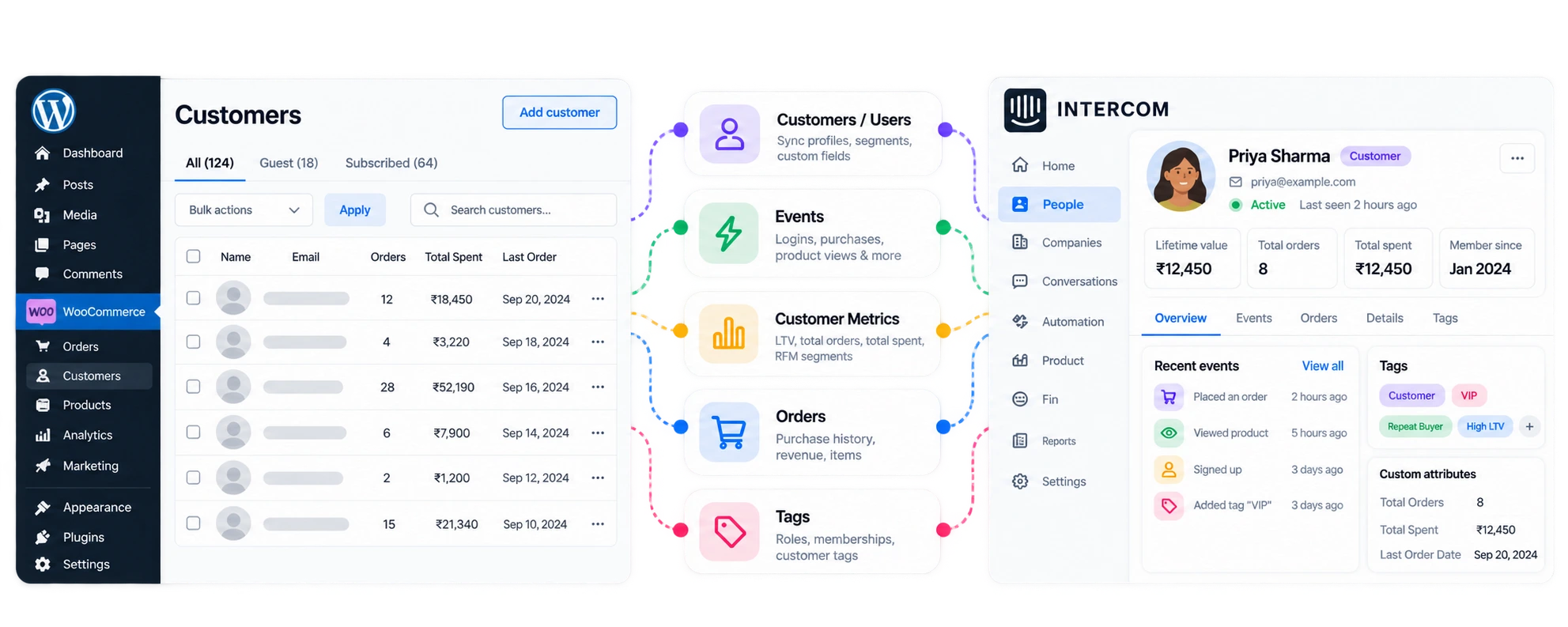
If agents open a ticket and still lack the order, cart events never start a Series, or you are patching the gap with Zapier and CSV, Sync Engine puts those store facts on the Intercom contact.
Keep purchase history on the Intercom contact. Orders, carts, and metrics sync from WooCommerce as they happen.
Woo stays the store of record. Intercom gets the customer journey your Series and Inbox already need.
Agents see order status, totals, and last purchase on the contact instead of digging through Woo mid-ticket.
Segment by LTV, AOV, VIP / At-Risk, and cart activity so a win-back Series does not also mail someone who ordered yesterday.
Order, cart, checkout, and subscription events reach Intercom when they happen on the store, not after a weekly export.
Align Woo customers with Intercom contacts, including Woo-sourced fields, custom mappings, and store metrics.
Email, name, phone from Woo billing, avatar, signup, and last activity.
Custom attribute mapping and store metrics (LTV, AOV, segments) land on the contact for Series and Inbox.
WooCommerce 8.0+ for store features. HPOS compatible. WordPress user and role sync works with or without Woo.
Order created, completed, and refunded, without double-sending the same order. Agents see purchase history without leaving Intercom.
Order created, order completed, and order refunded. The same order is not sent twice.
Order status, total, currency, items, shipping, and payment method on the contact.
Sync runs in the background on your WordPress site and stays within Intercom’s normal API limits.
Cart and checkout events with abandonment delays from 30 minutes to 24 hours. Placing an order cancels the pending abandonment job.
Cart item added starts enabled. Also: cart item removed, cart emptied, cart viewed, and checkout reached.
Cart abandoned and checkout abandoned for logged-in shoppers. Delays: 30 minutes, 1 hour, 2 hours, 4 hours, 8 hours, or 24 hours (default 1 hour).
Product viewed and category viewed (deduped 30 min), site search (5 min), product reviewed including guests. Wishlist and coupon events included.
You still build Series and Inbox rules in Intercom. Sync Engine’s job is making sure LTV, AOV, and segments are already there.
LTV after refunds, total revenue, refunds, AOV, order count, items, first/last order, days since last order, average days between orders, category, and payment method.
New (early lifecycle). VIP (LTV ≥ 1000 or ≥ 10 orders). At-Risk (more than 90 days since last order). Regular for everyone else in the active middle.
Support opens a ticket and already sees last order date and LTV. VIP gets different macros. At-Risk feeds win-back Series.
WooCommerce Subscriptions, Bookings, and Deposits events sit in the same event set. Status changes reach Intercom with the fields agents need.
Status changed, paused (on-hold or paused), purchased, renewed, trial ended, cancelled, and expired.
Purchased and renewed events include next payment date, product name, billing period, and amount.
Bookings and Deposits events sit alongside Subscriptions. Enable them under Events → Plugins.
Guest buyers become Intercom leads. When they register, history merges into the user contact so it is not split across two profiles.
Guest checkout creates an Intercom lead with the order history attached.
When the shopper registers, history merges into the user contact. One profile, not two.
Without merge, agents chase a lead and a user for the same buyer. Guest checkout is a common Woo gap Zapier rarely handles cleanly.
Woo stores that need orders, carts, and metrics on the Intercom contact so support and Series run on store truth.
Orders, carts, and LTV on the contact so agents see purchase history without leaving Intercom.
LMS and membership sites that also sell on Woo: role tags plus order history on one Intercom contact.
WooCommerce Subscriptions status, renewals, and next payment date on the contact for Series and Inbox.
One install path per client Woo store: orders and metrics in the inbox without custom glue.
Install the plugin, connect your Intercom workspace, then choose what from the store should sync.
Grab Sync Engine for Intercom from the WordPress.org listing and activate it. Store features need WooCommerce 8.0+ (HPOS compatible).
Sign in with OAuth, or paste an Access Token if that is how your team manages Intercom. Hit test connection until it says Connected.
Flip on the Woo events, metrics, and field mappings that matter. Messenger and identity verification stay optional.
Want screenshots and checklists? See How to connect Intercom to WordPress.
If your job is Woo orders, carts, KPIs, or subscriptions in Intercom, plan on Pro. Free is the install-and-connect path, plus useful WP user sync.
WordPress user sync, role tags, and 3 WordPress events, plus optional Messenger.
All Woo events, mapping, metrics, bulk sync, and tag automation.
Start free to connect and sync WordPress users. Store orders, carts, and metrics need Pro ($99/ year, billed yearly).
Those can move an order across now and then. Keeping Woo orders, carts, and metrics current on every Intercom contact is a different job, and that is what Sync Engine is for.
A checked export is fine once a month. It misses the order that completed after you downloaded the file.
One Zap can send a new order across. Always-running attributes, metrics, and subscriptions turn into several Zaps someone has to watch.
A custom integration means you write and maintain the connection. Sync Engine for Intercom is the ready-made WooCommerce to Intercom path.
Orders, carts, Zapier, and what lands on the Intercom contact when you sync from Woo.
Talk something through with usInstall Sync Engine for Intercom, connect with OAuth or an Access Token, and put WooCommerce orders, carts, and metrics on every Intercom contact.
Get support
We reply within one business day.
We got your message
Someone on the RippleStep team will follow up shortly. No need to resubmit.
Email supportBook a demo
Tell us about your stack. We will follow up with a focused walkthrough of RippleStep.