
Free
$0
lifetime
Try POinbox on real purchase orders before you commit to a monthly plan.
Includes
- ✓ 5 successful drafts lifetime
PDF to order Shopify
Wholesale teams still retype the purchase order the buyer sent. POinbox reads that order and builds the draft, so your team only checks the lines that need a decision.
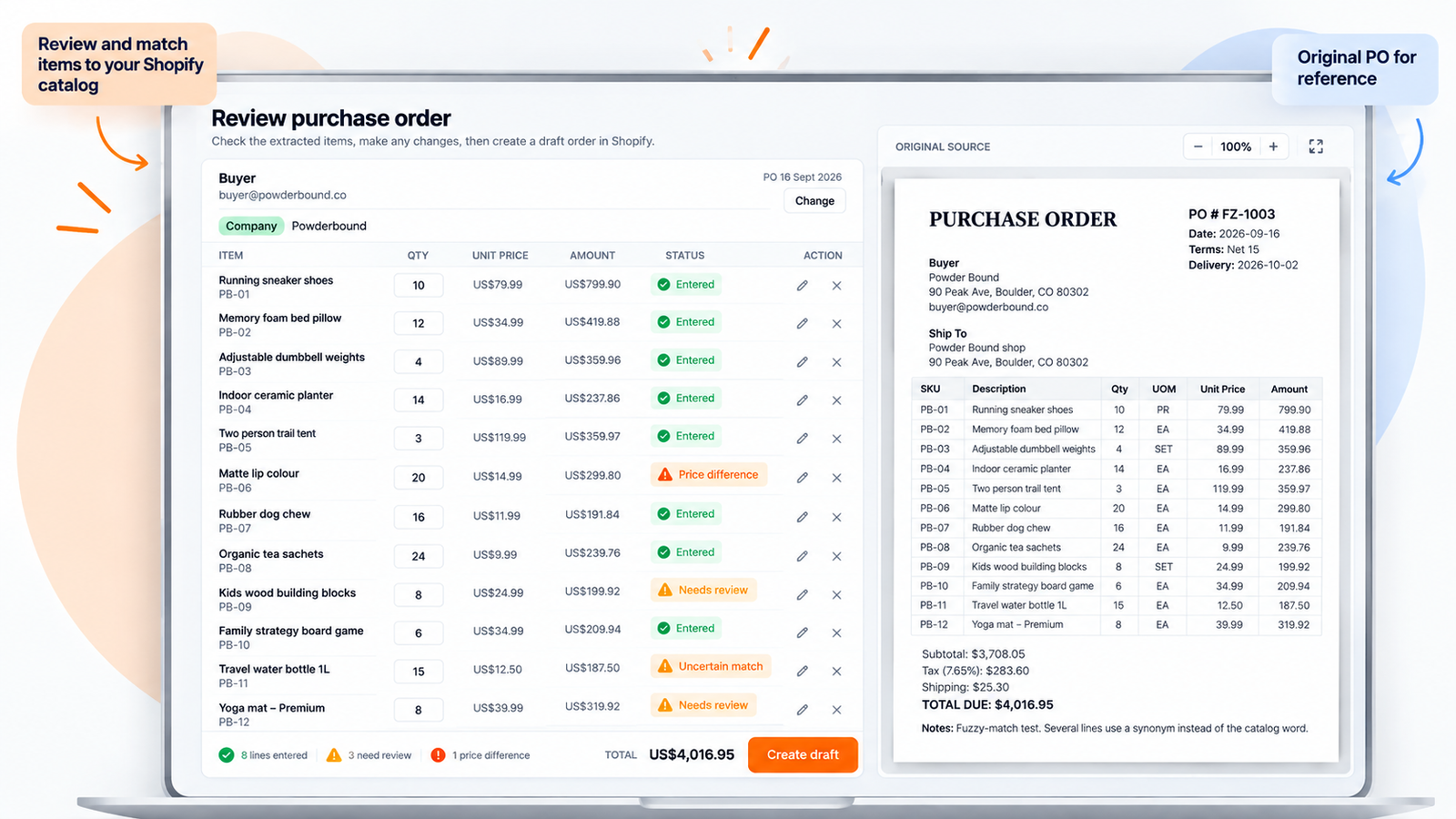
A customer purchase order, the document a wholesale buyer sends you, becomes a Shopify draft sales order. POinbox does that from PDF, email, Excel, CSV, and Word.
A PDF, an Excel sheet, or a Word file. The buyer already filled in the purchase order. Your team opens it from the inbox.
A product that is not in the catalog. A price that does not match. Lines that match go on the draft. Your team decides the rest.
A draft order, from the lines you kept. Convert it, and Shopify takes the payment, sends the invoice, and fulfils the order.
Shopify’s own B2B guidance is honest about this: phone and email orders become draft orders that staff create by hand. That path works. It also scales with headcount.
After the file lands, this is the work before anyone creates the draft.
PDF, Excel, CSV, Word, a photo, a scan, or the email itself. Settings shows a forwarding address. Forward the buyer’s email there, and the order is tied to that buyer.
A Shopify customer, a B2B company, and the company location. If the buyer is new, create them on the review screen. The name and address come off the purchase order. The draft is assigned to that buyer, and to the ship-to when you use Shopify B2B.
Catalog products, including the buyer’s own item codes. Confirm a code once and it is saved for that customer or company. A line you have not confirmed is left for you.
The draft uses your Shopify catalog price. If the purchase order shows a different unit price, you see both. Keep the catalog price, or take the price on the purchase order.
You review the lines that need a decision, then create the draft. Lines that are already right can go on it. A line you are still checking stays on the purchase order.
Free covers 5 successful drafts lifetime. Starter and Growth add monthly quotas. Enterprise is custom.
You are not migrating orders. You are giving the next emailed PO a draft to land in.
Install POinbox from the Shopify App Store. Start on Free (5 successful drafts), then pick a plan if you need more. Approve the access Shopify asks for, then send a PO.
Forward the email to your shop, or upload a PDF, Excel, CSV, Word file, or photo. Settings ties that message to the buyer. See PDF purchase order to draft order.
Confirm the customer, the B2B company, and the company location. The file sits beside the lines, so you check each flag on the purchase order before the draft exists.
Map a buyer SKU that did not match your catalog. Keep the catalog price, or take the unit price on the purchase order. PO vs catalog price shows both before you choose.
Create the draft from the lines you kept. The PO number is written on Shopify’s purchase order field. See convert a draft order to an order once you are ready.
The original file stays beside the lines. POinbox marks what is entered, where the price disagrees, and what still needs you.
Anything that already fits your catalog can move onto the draft without retyping.
When the PO and your catalog disagree, you see both. Keep yours, or take the price on the PO.
Lines that aren’t a clear hit stay off the draft until you confirm them.
You approve what’s ready. The PO number lands in Shopify’s PO field.
Wholesale ops, sales, and anyone opening attachments before the warehouse can pick.
Shopify stores that sell wholesale, including Shopify Plus B2B companies and locations. Draft orders still matter if you are not on Plus.
The person who opens the inbox, finds the attachment, and builds the draft before the warehouse can pick.
Or buyers who will not move off email. You can still run EDI for the accounts that require it.
Teams that want the catalog price on the draft, and a visible flag when the PO disagrees.
Free gets you started. Paid plans raise the monthly draft quota. Enterprise is custom.
Try POinbox on real purchase orders before you commit to a monthly plan.
For wholesale teams with a steady stream of emailed purchase orders.
For higher PO volume when Free and Starter quotas are not enough.
For volume, limits, or terms that need a tailored plan.
Price, formats, review, and what this is not.
Install POinbox, start on Free, send one real purchase order, and see which lines you still have to touch.
We reply within one business day.
Someone on the RippleStep team will follow up shortly. No need to resubmit.
Email supportTell us about your stack. We will follow up with a focused walkthrough of RippleStep.