
WordPress user sync, role tags, and 3 WordPress events, plus optional Messenger.
Included
- ✓ Basic WordPress user sync
- ✓ 3 basic WP events (registered, login, logout)
- ✓ Basic role tags
- ✓ Event prefix
- ✓ Optional Messenger + IDV
- ✓ Email support
WordPress Intercom Integration
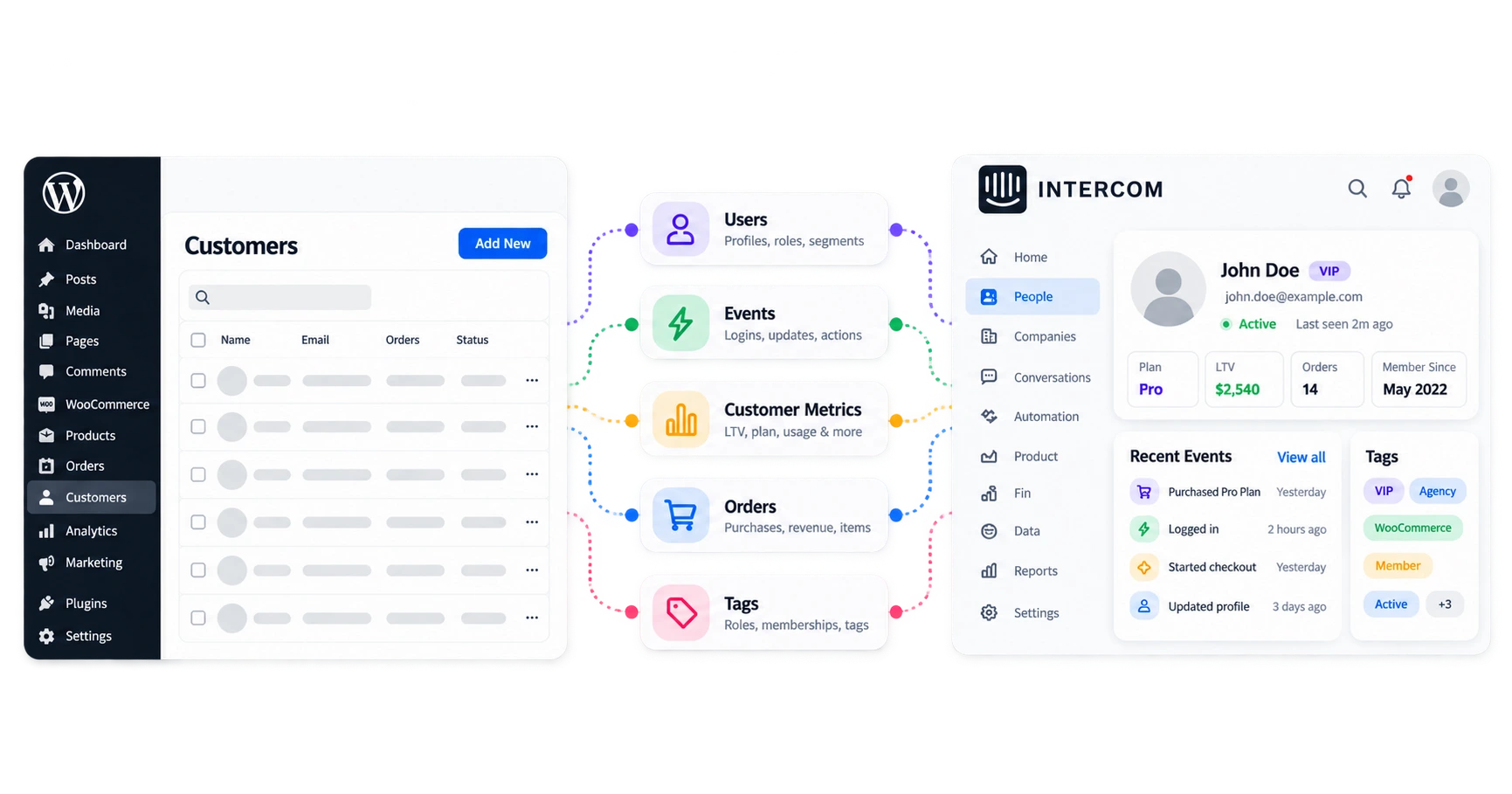
Sync Engine for Intercom syncs WordPress users, roles, events, WooCommerce activity, custom attributes, and metrics into Intercom so contacts match what happened on your site.

Intercom’s Messenger puts chat on the site. Sync Engine keeps contacts true to WordPress users, roles, and store activity. You can use both. Messenger stays optional.
Syncs WordPress users to Intercom contacts: profiles, role tags, events, WooCommerce activity, custom mapping, bulk sync, and metrics.
Puts the chat widget on your site. It does not, by itself, sync roles, order history, or custom WordPress fields into Intercom.
Chat only? Intercom’s own install docs. Users, roles, Woo orders, and attributes on the contact? You’re here.
If contacts show the wrong role, events never arrive, or you are still on CSV, Zapier, or a custom script, Sync Engine keeps those contacts current from WordPress.
Keep Intercom contacts true to WordPress. Profiles, roles, and events sync from your site as they happen.
WordPress stays the source of truth. Intercom shows the same roles, purchases, and events.
Stop CSV exports and re-entering roles. Intercom updates when someone registers, changes role, or buys on Woo.
Segment by roles, purchases, memberships, and store metrics so a Series for members does not also mail someone who never bought.
Signup, login, purchase, cart, and membership-related events reach Intercom so campaigns are not waiting on a spreadsheet.
When someone registers or updates a profile, Intercom should show it. Roles become tags, and tag automation keeps them current when roles change.
Email, name, phone (including Woo billing phone when Woo is present), avatar, signup, and last activity.
WordPress roles become Intercom tags. Those tags update when someone’s role changes.
Seven WordPress events: registered, logged in, logged out, profile updated, password reset, role changed, and user deleted. Three start enabled; turn on the rest under Events.
Map WordPress fields (and with Woo, billing, shipping, total spent, and order count) into Intercom custom attributes.
Choose the WordPress fields that matter for Series and Inbox. Sync Engine can create the attribute in Intercom if it is missing.
With WooCommerce present, map billing and shipping, total spent, and order count onto the contact.
Once attributes are mapped, Intercom rules and Series can target them without a manual export or Zap.
With WooCommerce 8.0+ (HPOS compatible), cart, checkout, and order events land on the Intercom contact, alongside Subscriptions, Bookings, Deposits, and store metrics.
Cart activity, checkout, and order created, completed, and refunded. Abandoned-cart delays from 30 minutes to 24 hours.
Order status, total, currency, items, shipping, and payment method land on the contact so support does not dig through Woo mid-ticket.
Subscriptions, Bookings, Deposits, and store metrics (LTV, AOV, VIP / At-Risk segments) are included.
Sync runs in the background on your WordPress site. Data goes from WordPress to Intercom. Credentials stay on your site.
Updates queue on your site so day-to-day traffic is not blocked. Bulk sync includes progress and a stop control.
Orders are not double-sent, and sync stays within Intercom’s normal API limits.
Connect with OAuth or an Access Token. Customer data is not routed through a RippleStep-hosted copy of your database.
For teams that already live in Intercom and need WordPress (and WooCommerce when you sell) to stay honest on the contact.
Contacts match real users and roles: signup, login, and role tags on the profile. Not a stale CSV.
Woo 8.0+, HPOS-compatible stores that need orders, carts, LTV, and VIP / At-Risk segments on the Intercom contact.
MemberPress, LearnDash, LifterLMS, EDD, and similar sites: role tags and mapped fields so membership context shows in Intercom.
Support stops alt-tabbing to WordPress mid-ticket. Agencies get one install path across client WordPress + Intercom stacks.
Install the plugin, connect your Intercom workspace, then turn on the sync that matches how you use WordPress.
Get Sync Engine for Intercom from the WordPress.org listing and activate it on your site.
Sign in with OAuth, or paste an Access Token if that is how your team manages Intercom. Hit test connection until it says Connected.
Enable user sync, the WordPress and WooCommerce events you care about, role tags, mapping, and metrics. Messenger and identity verification stay optional.
Want screenshots and checklists? See How to connect Intercom to WordPress.
Start Free for WordPress user sync. Move to Pro when you need WooCommerce events, mapping, bulk backfill, metrics, or tag automation.
WordPress user sync, role tags, and 3 WordPress events, plus optional Messenger.
All Woo events, mapping, bulk sync, metrics, and tag automation.
Start free for WordPress user sync. Upgrade to Pro ($99/ year, billed yearly) when you need WooCommerce events.
Those can get data across once in a while. Keeping WordPress users and roles current in Intercom every day is a different job, and that is what Sync Engine is for.
Stale the moment you download them. Fine for a one-time cleanup. Terrible as a weekly ritual.
Great automation glue. For always-running WordPress → Intercom profiles (plus Woo events, attributes, and metrics), task volume and mapping drift add up.
A custom integration means you write and maintain the connection. Sync Engine for Intercom is the ready-made WordPress to Intercom path, including WooCommerce when you sell.
How Sync Engine fits with Messenger, WooCommerce, and connecting your Intercom workspace.
Talk something through with usInstall Sync Engine for Intercom, connect with OAuth or an Access Token, and sync users, events, and store data into Intercom.
Get support
We reply within one business day.
We got your message
Someone on the RippleStep team will follow up shortly. No need to resubmit.
Typical reply: one business day
Email supportBook a demo
Tell us about your stack. We will follow up with a focused walkthrough of RippleStep.