
01
Install Now
Integration for Airtable
by RippleStep
Step 01
Install the plugin
Download and activate from the WordPress plugin directory. One click. No configuration yet, we'll get to that.
~30 seconds
Connect any major WordPress form builder to Airtable in minutes. Map fields, pick your base, submissions sync automatically. No code, no Zapier, no manual copy-paste.
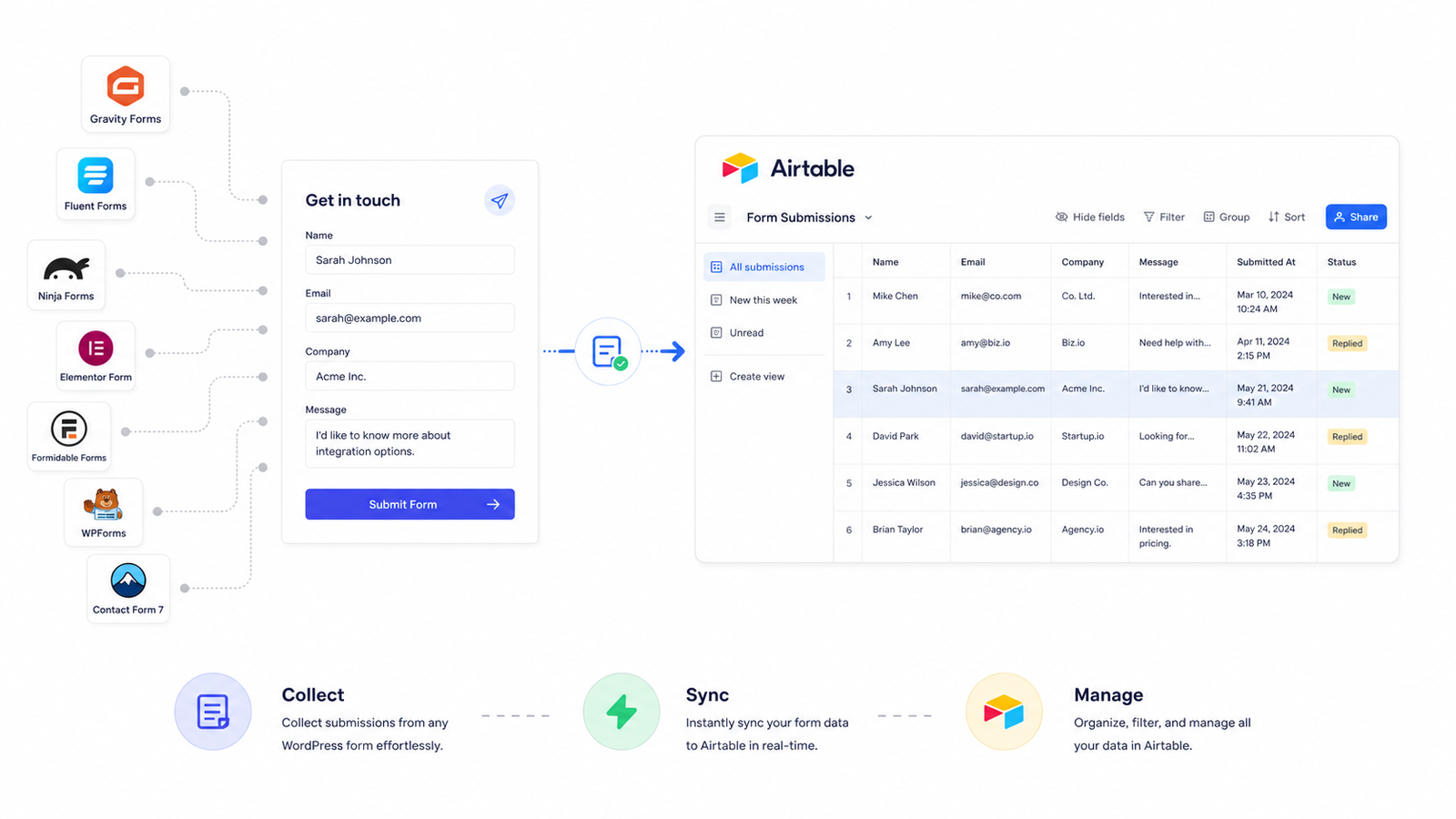
Every hour spent on manual exports or Zapier maintenance is an hour not spent growing.
Install from the WordPress plugin directory, connect your Airtable, map your fields. Most people are live in under five minutes.
Download and activate from the WordPress plugin directory. One click. No configuration yet, we'll get to that.
Pick your form, choose your Airtable base and table, then match each field to a column with a dropdown. Text, dates, checkboxes, it all maps cleanly.
Every form submission creates a new Airtable record the moment someone hits Submit. The sync runs in the background, your form always responds fast.
All form submissions flow into Airtable, no separate connectors.
All form submissions sync to your Airtable base. No Zapier or code required.
No JSON, no code editor. Just dropdowns and a Save button, here's exactly what you'll see inside your WordPress admin.
Manage your form to Airtable connections
| ACTIVE | FORM NAME | DESTINATION | ACTIONS |
|---|---|---|---|
Feedback Ninja Forms | BASE WP TABLE Ninja Feedback | ||
Customer Complaint Form (#3) Fluent Forms | BASE WP TABLE fkent | ||
Blank Form WPForms | BASE WP TABLE tblVvTsVRQOSeVku6 |
Connect and configure your Airtable integration.
Connect with OAuth. A personal access token also works.
Install and activate a form plugin to connect it to Airtable.
Map form fields to their corresponding Airtable columns.
Real-time sync, visual field mapping, and zero dependencies on third-party automation.
No batching, no delays, no manual exports. The form responds to your visitor immediately while the sync runs in the background, even if Airtable is slow or temporarily down.
Map any form field to any Airtable column with a visual dropdown. Text, dates, numbers, checkboxes. Point it at any base and table in your workspace, then switch destinations anytime without rebuilding your form.
Send each form to a different base or table. Keep contact, leads, jobs, and support cleanly separated.
Per‑form routingRésumés, images, and documents sync as Airtable attachments so everything lives in one place. Pro feature.
File attachmentsSee every attempt in a searchable log, status, errors, and debug details when you need them.
Transparent by designRuns inside WordPress, close to your forms. No extra accounts, no sync quotas, no surprise bills.
Native to WordPressJob applications, lead capture, event sign-ups, client intake, if you collect it in a form, it can land in Airtable.
Résumés and cover letters go straight into a recruiting base. Build a Kanban pipeline (Applied → Interview → Hired) without paying for an ATS.
Contact forms, demo requests, newsletter signups, all become Airtable records. Lightweight CRM without the spreadsheet shuffle.
Webinars, workshops, meetups. Capture attendee details, add check-in status or dietary preferences, no code required.
Agencies and freelancers: project briefs, discovery forms, and onboarding questionnaires flow into your Airtable tracker.
Sales inquiries and support tickets land in one base. Route, assign, and track, all from Airtable.
Nonprofits and communities: sign-ups, donations, membership applications. Everything in one place for reporting.
Zapier charges $240 to $1,200/yr and takes an hour to set up, for a sync you can do in 5 minutes, entirely inside your WordPress dashboard.
|
Integration for Airtable This Plugin | Zapier | Make | |
|---|---|---|---|
| Annual costTotal cost per year | $0 to $99/yr | $240 to $1,200/yr | $108 to $600/yr |
| Setup time | ~5 minutes | 30 to 60 min | 30 to 60 min |
| Lives inside WordPress | ✓ | - | - |
| Unlimited submissions | ✓ | - | - |
| No third-party account | ✓ | - | - |
| Works on staging & local | ✓ | - | - |
| Real-time sync | ✓ | ✓ | ✓ |
| File / attachment uploads | ✓ | ✓ | ✓ |
| Non-blocking sync | ✓ | Depends on plan | Depends on scenario |
| Sync Logs details | ✓ | Run history only | Run history only |
| Data stays on your server | ✓ | - | - |
| Retry failed syncs | ✓ | - | - |
| No cloud middleman | ✓ | - | - |
| Configure in WordPress onlyNo separate automation dashboard | ✓ | - | - |
| No OAuth or connections to maintain | ✓ | - | - |
| No dependency on third party uptime | ✓ | - | - |
We collect 200+ lead form submissions a week and they all land in Airtable automatically now. I deleted our Zapier account the same day I installed this plugin.
Exactly what I needed, no code, no complexity. Set it up in ten minutes on a client site and it's been running flawlessly for six months.
Our intake form used to require manual copy-paste every morning. Now it's instant. The file upload feature alone saved my team hours every week.
"We manage 14 client sites and every contact form goes straight to a shared Airtable base. The value at $99/year for unlimited connections is unmatched."
"I was paying $60/month for Zapier to do this one thing. $99/year is a no-brainer. Replaced it in under 10 minutes and it's been rock-solid."
"The submission log is underrated. Being able to see every sync attempt with timestamps gave my team peace of mind we never had with Zapier."
Start free and upgrade only when you're ready. No hidden fees, no per-seat charges, no surprises.
The two-way product page, the hub, and a walkthrough for every builder the plugin supports.
Free plan available. No credit card required. Live in under five minutes.
Get support
We reply within one business day.
We got your message
Someone on the RippleStep team will follow up shortly. No need to resubmit.
Email supportBook a demo
Tell us about your stack. We will follow up with a focused walkthrough of RippleStep.