
Sometimes you don't want to sync an entire Confluence space — you just need one page to appear inside an existing WordPress post, help article, or landing page. That's exactly what the shortcode embedding feature does.
In this guide you'll learn how to embed any Confluence page inside WordPress with a single shortcode, where to find both the Confluence page ID and space key in the plugin, and how to control what embedded content looks like on your site.
Embedding vs. Syncing — What's the Difference?
| Feature | Embed (Shortcode) | Full Sync |
|---|---|---|
| How it works | Renders Confluence page inline inside any WP post | Creates a separate WordPress page for each Confluence page |
| Best for | Inserting one doc into an existing page | Publishing a whole documentation site |
| Updates automatically | ✓ Yes (on page load) | ✓ Yes (on sync schedule) |
| Requires setup | Plugin installed + API token | Plugin + API token + sync configuration |
| Free plan | ✓ Included | Up to 10 pages |
What You Need
- A WordPress site (self-hosted)
- An Atlassian Confluence Cloud account
- The Content Publisher for Confluence plugin installed and connected
- The Confluence page ID and space key for the page you want to embed (both available in the plugin)
If you've already installed and connected the plugin (Step 1–2 below), skip straight to Step 3: Find Your Page ID and Space Key.
How to Embed Confluence in WordPress — Step by Step
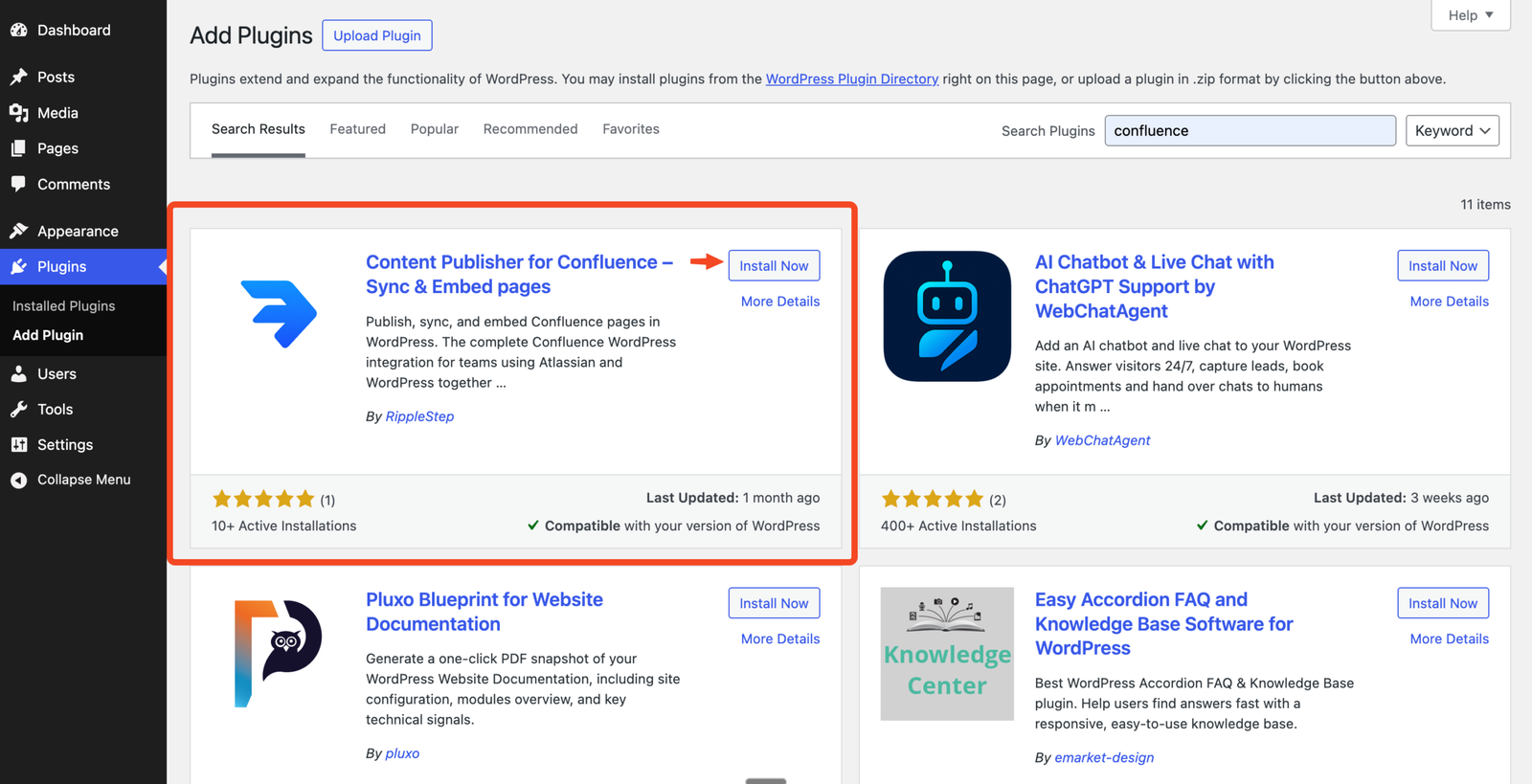
Go to Plugins → Add New in your WordPress dashboard. Search for "Content Publisher for Confluence", click Install Now, then Activate.
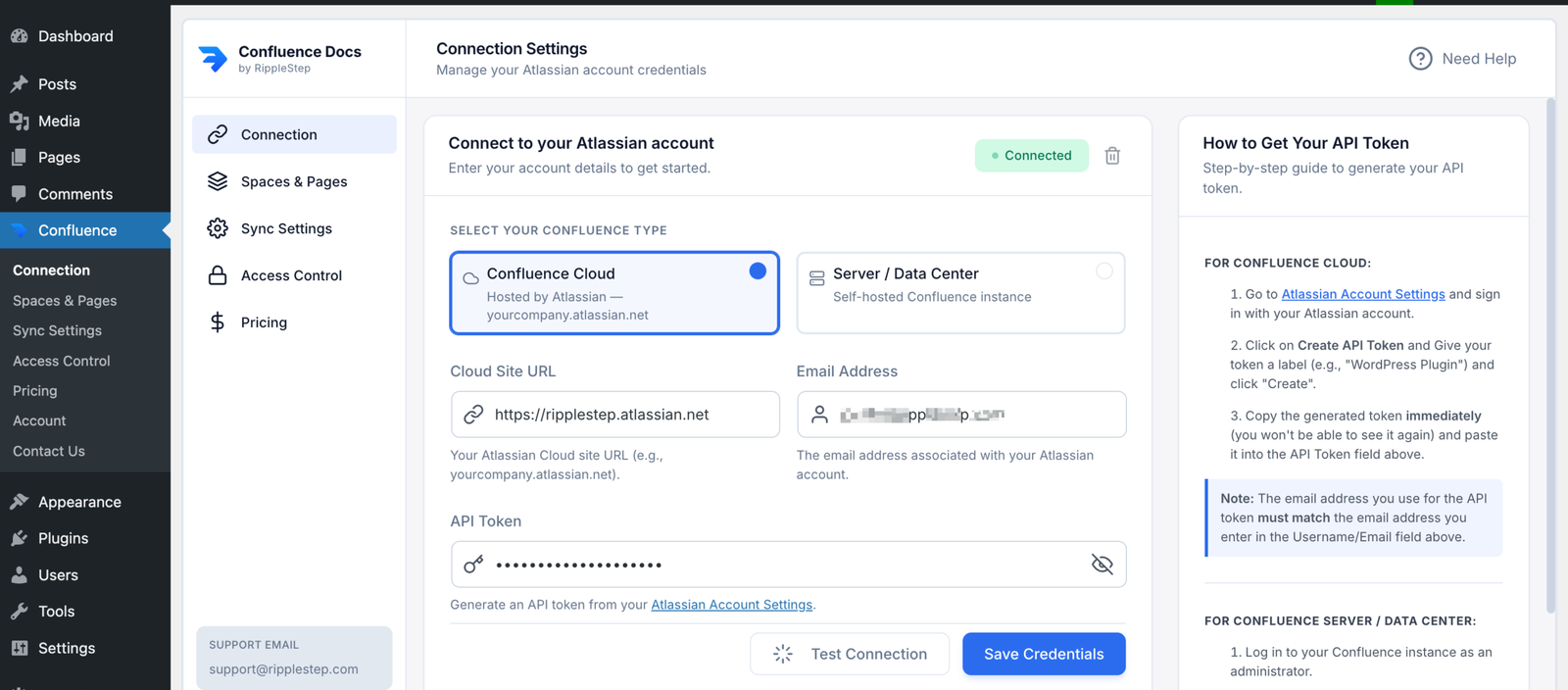
Go to Confluence Publisher → Settings → Connection. Enter your:
- Confluence site URL — e.g.
yourteam.atlassian.net - Email address — your Atlassian login email
- API token — generate one at id.atlassian.com/manage-profile/security/api-tokens
Click Save & Test Connection. You'll see a green success message when connected.
Open Confluence Publisher inside WordPress and select the page you want to embed. The plugin shows both the required values: space key and page ID.
Open any WordPress post or page in the editor. Place your cursor where you want the Confluence content to appear. Add the shortcode:
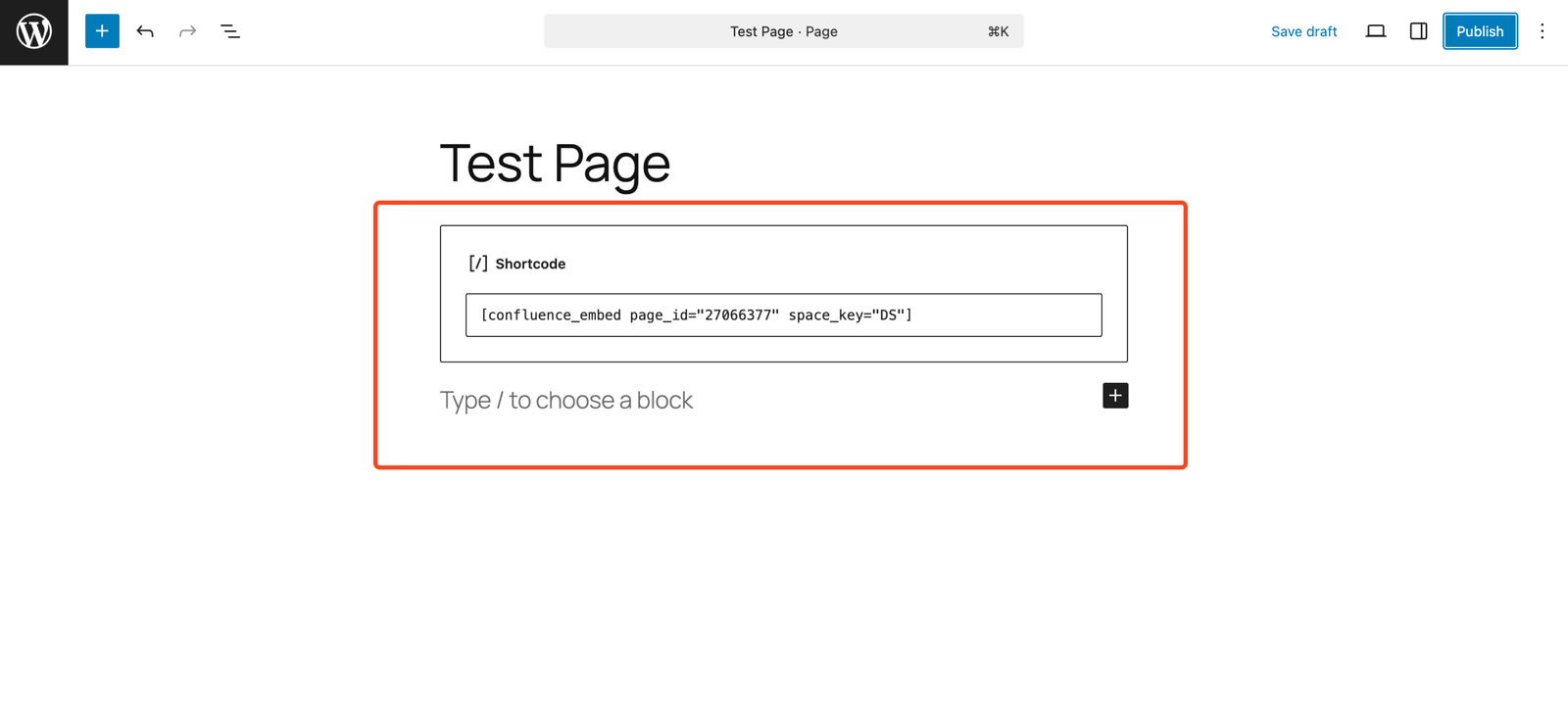
Replace DOCS and 123456789 with your actual space key and Confluence page ID from the plugin. Click Publish or Update.
View the WordPress page on the frontend. The Confluence page content will render inline — headings, lists, tables, images, and code blocks all included. The content inherits your WordPress theme's typography for a seamless look.
When to Use Embedding vs. Full Sync
Product changelog
Embed your Confluence changelog page into a WordPress "What's New" post. Stays current automatically.
Help articles
Embed a Confluence troubleshooting guide directly inside a WordPress support article.
Landing pages
Pull a Confluence technical spec or data sheet into a WordPress product page without re-formatting.
Knowledge base entries
Embed individual Confluence wiki pages inside WordPress knowledge base articles managed by your content team.
Terms & policies
Embed your Confluence privacy policy or terms of service into a WordPress legal page — single source of truth.
Team wikis
Surface Confluence internal wiki pages inside a WordPress intranet portal — with access control per role (Pro).
Free vs Pro: Which Plan Do You Need?
Start free, then upgrade when you need higher limits and advanced access controls for embedded content.
Starter
Best for embedding a limited set of pages quickly.
- Embed up to 10 Confluence pages
- 1 Confluence space
- Built-in caching for performance
- Basic access control
- Community support
Troubleshooting Embedded Confluence Content
Make sure shortcodes are enabled in your theme's content area. Some page builders require you to add a Shortcode block instead of pasting directly into a text field.
Check your API token is still valid in Atlassian account settings. Also verify both the space key and page ID in your shortcode match the values shown in the plugin.
The shortcode caches content for 1 hour by default. If you need to see updates immediately, add cache="0" to the shortcode temporarily, or clear your WordPress cache plugin's cache.
Confluence-hosted images require your API token to be valid. If images show as broken, re-verify your API token connection in the plugin settings.
FAQ — Embedding Confluence in WordPress
Yes. The shortcode embedding feature works independently of the sync feature. As long as your plugin is installed and your Atlassian account is connected, you can embed any Confluence page without syncing anything.
Yes. Add a Shortcode element/widget in your page builder and paste the confluence_embed shortcode. It works with Elementor, Divi, Beaver Builder, Bricks, and any builder that supports native WordPress shortcodes.
Yes. The plugin's access control features apply to embedded content too. On the free plan you can restrict to logged-in users. On Pro you can restrict by specific WordPress user role — so administrators see content that subscribers don't.
The plugin caches embedded content on your server (default: 1 hour), so each page load doesn't hit the Confluence API. Performance impact is minimal after the first load.
Yes. Add multiple shortcodes to the same WordPress post or page, each with its own space_key and Confluence page ID. Each embeds independently.
Start embedding Confluence in WordPress today
Install the free plugin, connect your Atlassian account, and embed your first Confluence page in under 5 minutes.
Install Content Publisher for Confluence Free →